Skip to content

Open source | MIT licensed

Your server should do more than deploy apps. Vexlyx brings the rest with it.

Deploy modern applications, host WordPress and PHP, and manage the domains, DNS, databases and email around them from one open-source control panel.

Live today. Installs on a fresh Ubuntu 24.04 server with one command.

root@your-server: ~

$ VEXLYX_DOMAIN=panel.yourdomain.com curl -fsSL https://vexlyx.atlantiqs.org/install.sh | bash

==> [1/16] Preflight checks

✓ Ubuntu 24.04, running as root

==> [3/16] Installing Docker Engine + Compose

==> [9/16] Building the panel (pnpm install + build)

==> [12/16] Running database migrations

==> [14/16] Starting all services

==> [15/16] Configuring firewall (UFW)

==> [16/16] Done

Vexlyx is installed.

Panel: https://panel.yourdomain.com

Point these DNS records at 203.0.113.10:

A panel.yourdomain.com

A api.panel.yourdomain.com

A webmail.panel.yourdomain.com

A *.panel.yourdomain.com

Abridged output. Example domain and IP. Safe to re-run at any time.

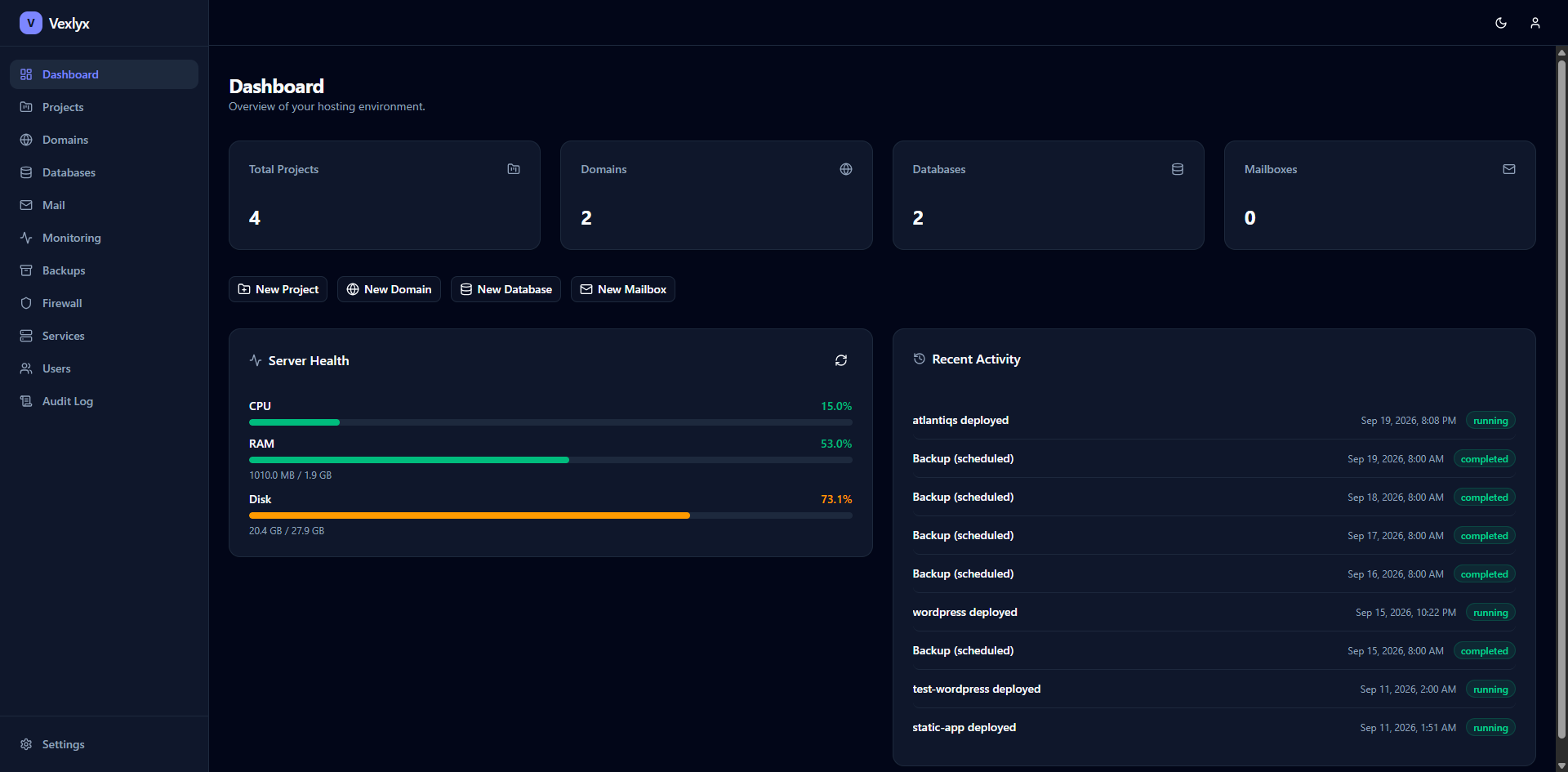
panel.yourdomain.com/dashboard

The Vexlyx dashboard: project, domain, database and mailbox counts, live server health for CPU, RAM and disk, and a recent activity feed of deploys and backups.

Architecture

One server, with the services already connected.

Vexlyx installs and connects the services behind your apps, sites, email and DNS. You manage them through one dashboard instead of a stack of unrelated tools.

Your serverUbuntu 24.04
  1. Web

    HTTP | HTTPS

    Traefik

    Routing and automatic SSL

    Your apps

    • Next.js
    • Node.js
    • Python
    • React / Vite
    • Static
    • Dockerfile

    Sites

    • WordPress
    • PHP

    The panel

    • Dashboard
    • API
  2. Email

    SMTP | IMAP

    Postfix + Dovecot

    Send and receive

    Mailboxes

    • Aliases
    • Vacation replies
    • SPF | DKIM | DMARC

    Webmail

    • Roundcube
  3. DNS

    Queries on port 53

    CoreDNS

    Authoritative, opt-in

    Your domains

    • Zones
    • A | MX | TXT records
    • Nameserver check

Databases

  • PostgreSQL 16
  • MySQL 8

Files

  • File manager
  • SFTP

Operations

  • Backups
  • Firewall
  • Monitoring
  • Audit log

Two worlds

Modern applications and traditional hosting belong together.

Deploy a modern application without giving up the WordPress sites, mailboxes, domains and DNS records the same business still needs.

Modern deploys

Push code. Get a running app.

For Next.js, Node, Python, React and anything with a Dockerfile.

  • Git and auto-deploy

    Connect a GitHub, GitLab or Bitbucket repo. A push redeploys through a webhook.

  • Zero-config builds

    Nixpacks detects the framework and builds the image. Or bring your own Dockerfile.

  • Live logs

    Build and runtime logs stream to the dashboard as they happen.

  • Environment variables

    Set per project, encrypted at rest, injected into the container at runtime.
Traditional hosting

Host sites, mail and domains.

For agencies and clients who still need WordPress, email and DNS.

  • WordPress and PHP

    One-click WordPress, or upload PHP files with the file manager and SFTP. No build step.

  • Domains, DNS and SSL

    Attach domains and subdomains with automatic certificates. Keep DNS at your registrar or host it on Vexlyx.

  • A full mail server

    Mailboxes, aliases, webmail and vacation replies, with SPF, DKIM and DMARC set up for you.

  • Databases

    MySQL and PostgreSQL per project with generated credentials and Adminer.

One dashboard, one login, one backup. Both worlds share the same users, roles, firewall and audit log. Backups cover projects, databases, mail and DNS together.

Deploy flow

Push your code. Vexlyx handles the path to HTTPS.

  1. 1

    Push

    QUEUED

    A push to your connected branch triggers a GitHub webhook. Or click Deploy.

  2. 2

    Build

    BUILDING

    Nixpacks detects the framework and builds an image. A Dockerfile works too.

  3. 3

    Deploy

    DEPLOYING

    Vexlyx writes the compose file and starts the container behind Traefik.

  4. 4

    Live on HTTPS

    RUNNING

    Your app gets a subdomain and a Let's Encrypt certificate. No manual routing.

Build and deploy log

webhook: push to main (a1b2c3d)

git: cloning repository

nixpacks: detected Next.js, Node 22, pnpm

nixpacks: install, build, start plan ready

nixpacks: image built

[vexlyx] Generating docker-compose.yml

[vexlyx] Starting container: image=my-app port=3000

[vexlyx] Container started: id=9f3c1d2e4a7b

RUNNING https://my-app.panel.yourdomain.com

Illustrative log. Real builds stream to the dashboard live.

Product tour

See the panel before you install it.

Every screen below comes from a running Vexlyx installation.

Every app and site in one place.

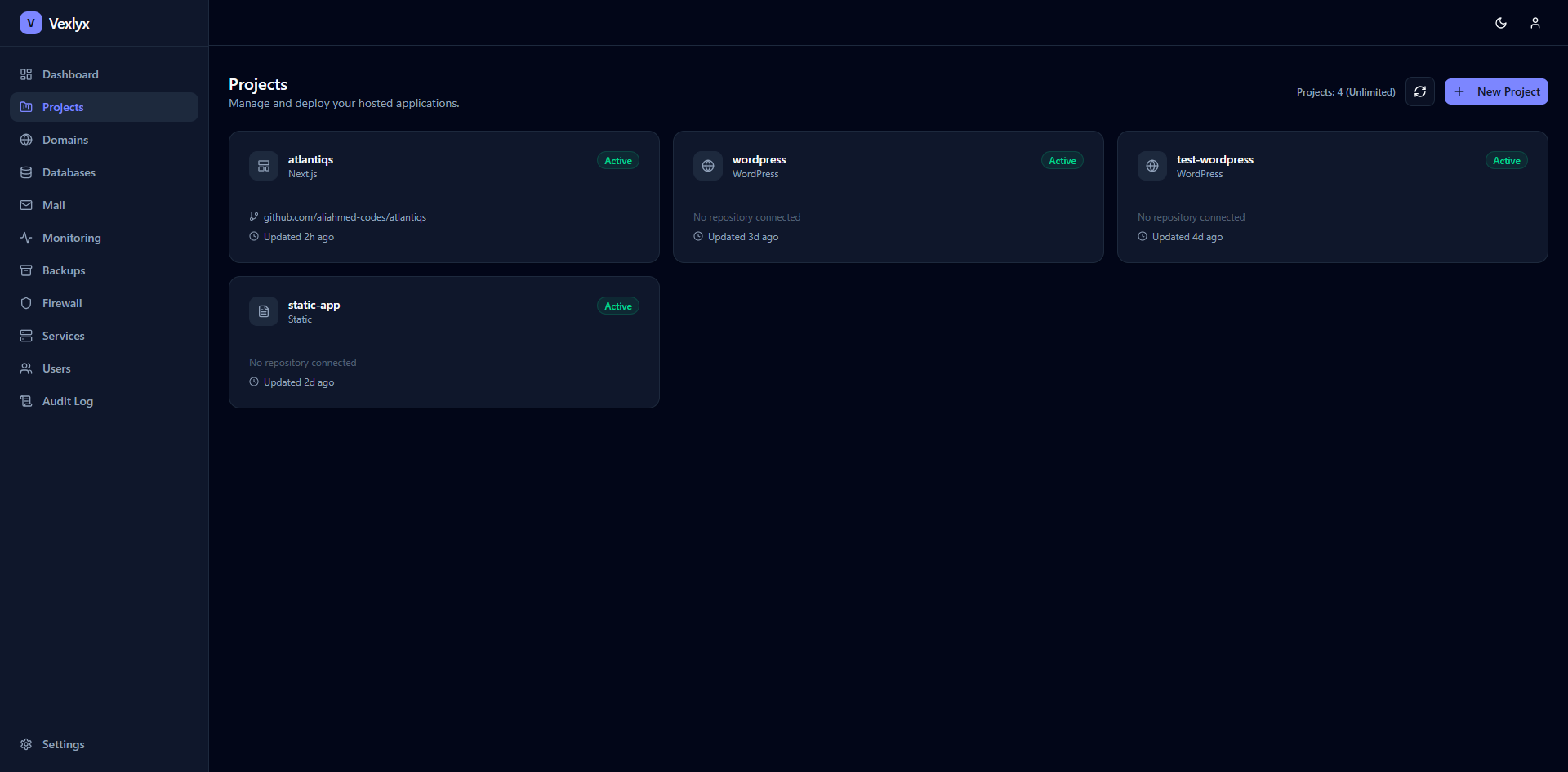
Next.js apps, WordPress sites and static projects side by side, with status, connected repository and last update.

Swipe sideways to explore.

panel.yourdomain.com/projects

The Projects page: a grid of project cards for a Next.js app, two WordPress sites and a static site, each with an Active badge.

Operations

Run the server without living in the terminal.

Certificates, backups, monitoring, firewall rules, access control and account security are managed from the same dashboard.

Under the hood

Familiar infrastructure, connected by Vexlyx.

Your workloads stay on Docker, Traefik, PostgreSQL, MySQL and other established open-source tools. Vexlyx gives you one place to operate them without hiding what runs underneath.

Traefik v3
Reverse proxy and automatic Let's Encrypt certificates
Docker Compose
Every app, site and service runs in its own container
Nixpacks
Zero-config builds that detect your framework
PostgreSQL 16
The panel's data, and databases for your projects
MySQL 8
Databases for your projects
Redis 7
Sessions and background job queues
Postfix
Outgoing and incoming SMTP
Dovecot
IMAP mailboxes and vacation replies
Roundcube
Webmail in the browser
CoreDNS
Authoritative DNS for domains you host
Next.js 15
The dashboard
Fastify + Prisma
The API and its database layer

Compare

Choose the panel that matches how you host.

Vexlyx combines app deployment with the mail, DNS and account controls expected from a traditional hosting panel. Competitor details come from each vendor's own pages, reviewed in September 2026.

Feature comparison of Vexlyx with Coolify, Dokploy, CapRover, Plesk and cPanel
FeatureVexlyxCoolifyDokployCapRoverPleskcPanel
LicenceMITApache 2.0Apache 2.0 + proprietary directoryApache 2.0CommercialCommercial
Entry price to self-hostFreeFreeFreeFreeFrom €6.60/moFrom $29.99/mo
Deploy Docker apps from GitYesYesYesYesYesNot found
WordPressYesYesNot foundYesYesYes
Built-in mail serverYesNot foundNot foundNot foundYesYes
Authoritative DNS hostingYes, opt-inNot foundNot foundNot foundYesYes
Multiple users and resellersYesNot foundYesNot foundYesYes

Not found means we did not find the feature in the vendor's own pages. It does not mean the product lacks it. Spotted a mistake? Tell us and we will fix it.

Plesk price is the Web Admin edition (10 domains) on a VPS, billed yearly. cPanel price is the Solo tier (1 account), billed monthly.

Dokploy licenses most of its code under Apache 2.0 and reserves a proprietary directory for future paid features.

Coolify and Dokploy also sell optional managed cloud plans. Self-hosting is free.

Sources

Open source

Open code. Clear progress. Your server.

Read every line, run it on your own hardware and adapt it to your needs. Vexlyx is live, MIT licensed and available to install today.

Available today

  • Git deployments with automatic HTTPS
  • WordPress, PHP and custom Docker workloads
  • Domains, hosted or external DNS and SSL
  • Mailboxes, aliases, webmail and mail authentication
  • Databases, backups, monitoring and firewall controls
  • Multiple users, reseller roles, audit logs and two-factor authentication

Get started

Bring a fresh server. Leave with a working panel.

Four steps take you from Ubuntu 24.04 to a live panel with HTTPS. The installer checks the server before every action and is safe to run again for an upgrade or repair.

  1. 1

    Get a server

    A fresh Ubuntu 24.04 server (x86_64 or arm64) with root access, plus a domain you control. Ports 80 and 443 must be reachable so Traefik can request a certificate. Other distributions run with a warning and may behave differently.

  2. 2

    Point DNS at it

    Create these A records, all pointing at your server's public IP. The installer prints the IP and the list again when it finishes, and Settings in the panel shows them later.

    DNS records to create
    TypeName
    Apanel.yourdomain.comThe dashboard
    Aapi.panel.yourdomain.comThe API the dashboard calls
    Awebmail.panel.yourdomain.comRoundcube webmail
    A*.panel.yourdomain.comSubdomains of the apps you deploy
  3. 3

    Run the installer

    As root, replace the domain with yours. To choose the admin account, add VEXLYX_ADMIN_EMAIL and VEXLYX_ADMIN_PASSWORD in front. Without a password, one is generated and shown once at the end.

    root@your-server: ~
    $ VEXLYX_DOMAIN=panel.yourdomain.com curl -fsSL https://vexlyx.atlantiqs.org/install.sh | bash
  4. 4

    Sign in

    Open your panel domain and sign in with the admin email. If the installer generated the password, it is shown once at the end of the run and is not stored anywhere, so save it. Until DNS propagates, Traefik keeps retrying the certificate on its own.

Prefer to check it before running it?

Current branch main

Piping a script into a root shell asks for trust. Download it, verify the SHA-256 checksum, read it, then run it. Downloading first also lets the installer ask for your settings interactively, which a pipe cannot.

Verify, then run
$ curl -fsSLO https://vexlyx.atlantiqs.org/install.sh$ echo "14d3497073d7187b2a3e262bbe0763abd1688515eabed6c38ab72040c5450f61  install.sh" | sha256sum -c -$ sudo bash install.sh

SHA-256: 14d3497073d7187b2a3e262bbe0763abd1688515eabed6c38ab72040c5450f61

FAQ

Questions, answered plainly.

What do I need to run Vexlyx?

A fresh Ubuntu 24.04 server (x86_64 or arm64) with root access, and a domain you control. Ports 80 and 443 must be reachable so Traefik can get a Let's Encrypt certificate. The installer targets Ubuntu 24.04; other distributions run with a warning and may behave differently.

See the install steps

Is it really free?

Yes. Vexlyx is MIT licensed and free to self-host. You pay for your own server and domain, nothing to us.

How is it different from Coolify, Dokploy, CapRover, Plesk or cPanel?

Coolify, Dokploy and CapRover focus on deploying apps. Plesk and cPanel focus on traditional hosting and are commercial. Vexlyx puts both in one open-source panel: deploy a Next.js app, host a WordPress site, and run the mailboxes and DNS for the same domain.

See the comparison

Which kinds of apps can I deploy?

Next.js, Node.js, Python (Django, Flask, FastAPI), React with Vite, static sites, PHP, WordPress, and anything with your own Dockerfile. Projects can deploy from Git, and a push can trigger a redeploy through a GitHub webhook.

Can I run email from it?

Yes. Vexlyx runs Postfix and Dovecot with Roundcube webmail, and sets up SPF, DKIM and DMARC records for you. Whether mail reaches inboxes also depends on things outside the panel: your server's IP reputation, whether your host allows outbound port 25, and reverse DNS. Vexlyx shows the records to publish and checks them against live DNS.

Do I have to move my DNS to Vexlyx?

No. By default a domain stays at your registrar: you add an A record and a verification TXT record, and Vexlyx routes it. Hosting DNS on Vexlyx is an opt-in per domain, done by pointing the domain's nameservers at your server.

How does Vexlyx protect the panel?

Passwords are hashed with Argon2id, sessions use HTTP-only cookies and login attempts are rate limited. Sensitive values such as database passwords and environment variables are encrypted at rest with AES-256-GCM. TOTP two-factor authentication includes recovery codes, trusted devices and admin recovery controls. To report a vulnerability, use the project's security policy.

Security policy

Can I host clients or resell hosting?

Yes. There are Admin, Reseller and User roles with fine-grained permissions, quotas, optional overselling for resellers, and an audit log of who changed what.

What if the installer fails halfway, and how do I upgrade?

Run it again. Every step checks the real state of the server before acting, so a re-run only redoes what is missing. The same re-run is how you upgrade or repair an install.

Is it ready for production?

Yes. Vexlyx is live and running real workloads. Deployments, domains, DNS, mail, backups, monitoring, access control and two-factor authentication are available today. As with any self-hosted platform, keep current backups, review updates before applying them and test important changes first.

Where do I get help?

Ask in GitHub Discussions, open an issue for bugs, or read the docs. For anything else, email hello@atlantiqs.org.

GitHub Discussions

Newsletter

Release notes, when there is something to say.

New versions, security fixes and what we are building next. Occasional emails. You confirm your address first and can unsubscribe at any time.

Emails are sent through Buttondown.